Utilities – New function „Inspect Instance Note“
Version 12.0.1.0
To start Inspect Instance Note  , click on the GT MBD ribbon is in the APPLY AND EXPORT section in the drop-down menu under Inspect.
Please note: GENIUS TOOLS Inspect Instance Note is only available with subscription license. |
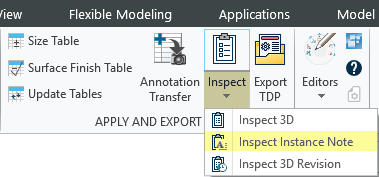
With Inspect Instance Note, inspection symbols and notes can be selected to add a note. This shows which inspection symbols belong to the respective pattern.
User interface
The user interface of Inspect Instance Note consists of the following elements:
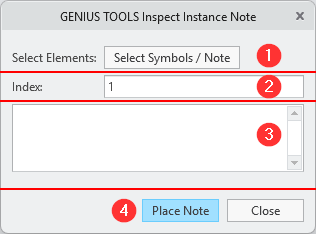
Inspect Instance Note dialog box
1.Enables the selection of symbols or a previously created note.
2.Consecutive numbering of notes, starting with 1.
3.Displays the currently selected symbols and notes. This list determines which inspection symbols are listed in the note.
4.Creates the note for placing at the desired positions; all entries from the list are output with the current index. Quit the function by clicking Close.