Startup TOOLS: Changes in the data packages
Version 9.0.1.0
Changes in the data packages can affect files of the project or data directories. These are subdirectories of the system directories projects or data:
–Creo configuration settings of the standard startup projects: <operatingenvironment>\parametric\configuration\projects
e. g., in the startup project directory for Creo 12: std_sut_creo_c12p.
–Object data for standard objects: <operatingenvironment>\parametric\data
e. g., in the data directory for Creo 12: sut_creo12.
Please note: As of version 9.0.0.0 the project and data directories have been renamed as well as the files for the configuration options (config_*.pro files), see Changes in version 9.0.0.0. |
— Configuration settings for startup projects
The following Creo configuration options have been added (+), removed (–), or changed (~) in the config_*.pro files (configuration blocks) of the standard startup projects:
Versions: Creo 4.0 – 9.0
In file config_sut_c*p_core.pro
~ |
display |
shadewithedges —> shadewithreflect |
+ |
default_hatch_type |
pat |
– |
save_texture_with_model |
yes |
In file config_sut_c*p_dir_file.pro
+ |
default_scene_filename |
$GTS_DATA\graphic-library\scenes\sut_std_scene.scn |
– |
global_appearance_file |
$GTS_DATA\config\global.dmt |
+ |
graphics_library_dir |
$GTS_DATA |
+ |
hatch_pattern_cfg_file |
$GTS_DATA\library_dir\crosshatch_dir\sut_patterns_imagestyleclass="Default" scale.cfg |
– |
texture_search_path |
$GTS_DATA\library_dir\textures |
In file config_sut_c*p_piping.pro
~ |
piping_appearance_map_file |
$GTS_DATA\library_dir\piping_config\mcat_dir\piping_appearance.dmt —> |
File
+ |
config_sut_c*p_imexport |
— Object data: Configuration settings
The following Creo configuration options have been added (+) and removed (–) in the data packages of Startup TOOLS:
In directory sut_creo*
+ |
graphics_library_dir |
$GTS_DATA |
– |
pro_colormap_path |
$GTS_DATA\config |
– |
global_appearance_file |
$GTS_DATA\config\global.dmt |
See also Data package: Switch path for graphics library.
— Object data: New settings for appearances and material files
When updating to version 9.0.1. and newer, new settings for color effects and material files must be made in the data packages.
Appearances
In Startup TOOLS 9.0.1. a new directory for graphic representations has been created in the data directory, the directory graphic-library. This makes it easier to customize the Creo Parametric dialog with company-specific appearances and Creo users can use the standard working procedure for Creo Parametric.
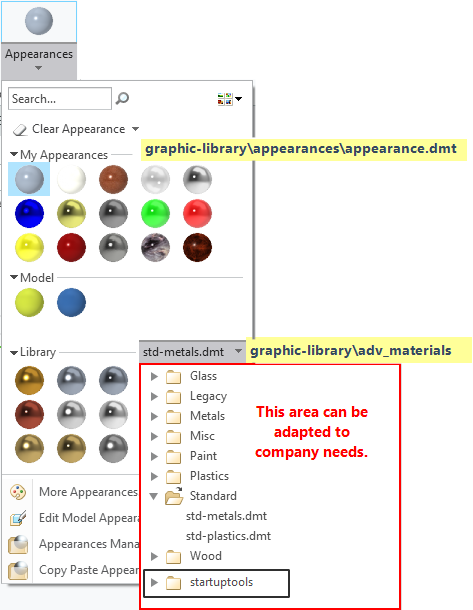
Creo Appearances dialog with area containing the Startup TOOLS graphics library
Material files
The material files include an additional default appearance as well as a hatch definition (if different from the default line). The material file only stores the names of the appearance or hatch definition. In a Creo Parametric session, access to the definitions/files must be configured accordingly.
Please note: Changes in data packages can be diverse and vary in complexity. In a simple case, a Creo Parametric symbol may be changed – in this case only one file would be affected, which can easily be transferred manually after a user check. However, if a work process is changed, e. g. the use of appearances and hatch definitions in material files, many files and configuration settings will be affected. The effects of each file must therefore be checked. It is recommended to use a test environment. |